ERP vs MRP: Key Differences Explained [2026 Guide]
Aleksander Nowak · 2026-02-04 · Manufacturing Basics
If you're running a small manufacturing business, you've probably seen these acronyms everywhere. MRP, ERP, MRP II — it can feel like alphabet soup. And the more you research, the more confusing it gets, because many articles use these terms interchangeably. Let me clear this up for you.
ERP vs MRP: What's the Difference and Which One Do You Need?
If you're running a small manufacturing business, you've probably seen these acronyms everywhere. MRP, ERP, MRP II — it can feel like alphabet soup. And the more you research, the more confusing it gets, because many articles use these terms interchangeably.
Let me clear this up for you. I've spent years working with manufacturers who struggled with this exact question, and the answer is simpler than most software vendors want you to believe.
The Short Answer
MRP (Material Requirements Planning) helps you figure out what materials you need, when you need them, and how much to order. That's it. It's focused purely on production and inventory.
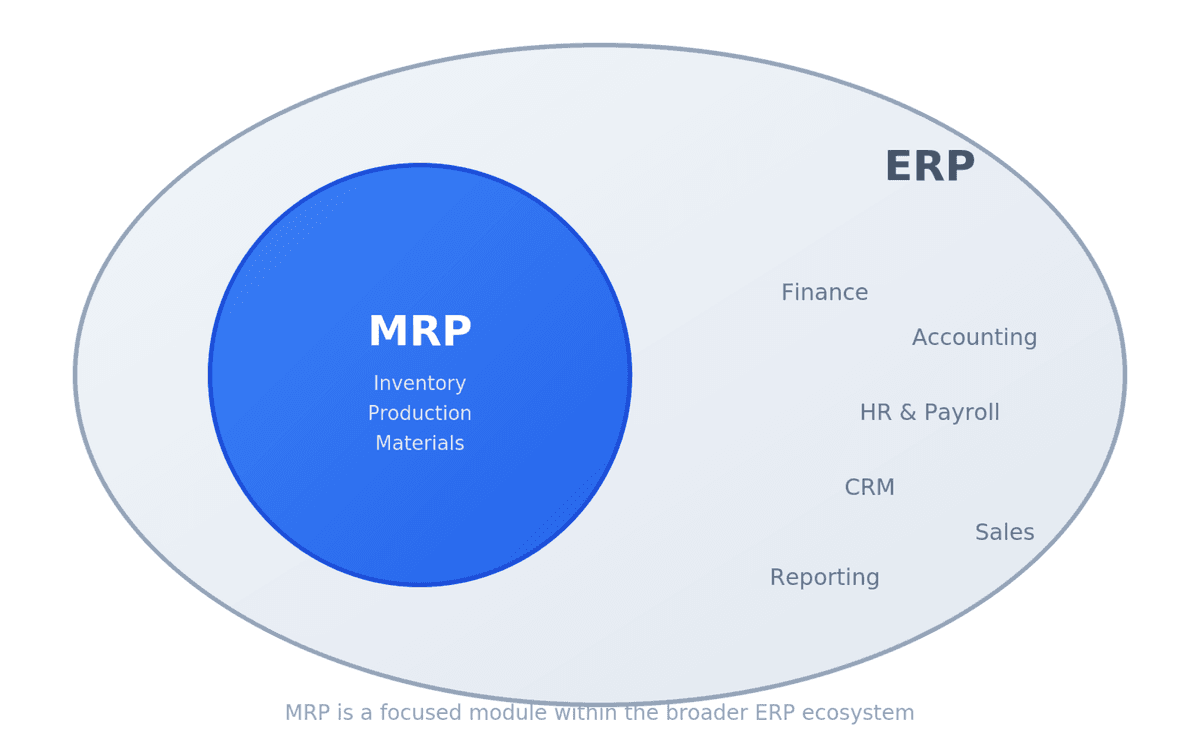
ERP (Enterprise Resource Planning) does everything MRP does, plus it handles your accounting, HR, sales, CRM, and pretty much every other business function. Think of ERP as MRP's bigger, more expensive sibling.
Here's a real example. Say you make handmade candles. An MRP system would track your wax, wicks, fragrance oils, and jars. It would tell you "You have orders for 500 candles this month, you need to order 25kg of soy wax by Tuesday." An ERP system would do all that, plus manage your QuickBooks integration, track employee hours, handle customer invoices, and generate profit reports.
A Bit of History (It Actually Matters)
Back in the 1960s, manufacturers were drowning in paperwork. They tracked inventory on index cards and hoped they wouldn't run out of materials mid-production. Joseph Orlicky at IBM developed the first material requirements planning system to solve this — and MRP was born.
The logic was simple but revolutionary: start with what you need to make (the finished product), break it down into components (bill of materials), check what you have in stock, and calculate what to order. Black & Decker was one of the first companies to implement it, and by 1975, over 700 companies were using MRP systems.
Through the 80s, these systems evolved. MRP II added capacity planning and shop floor scheduling. Then in the 90s, Gartner coined the term "ERP" to describe systems that went beyond manufacturing to cover the entire enterprise.
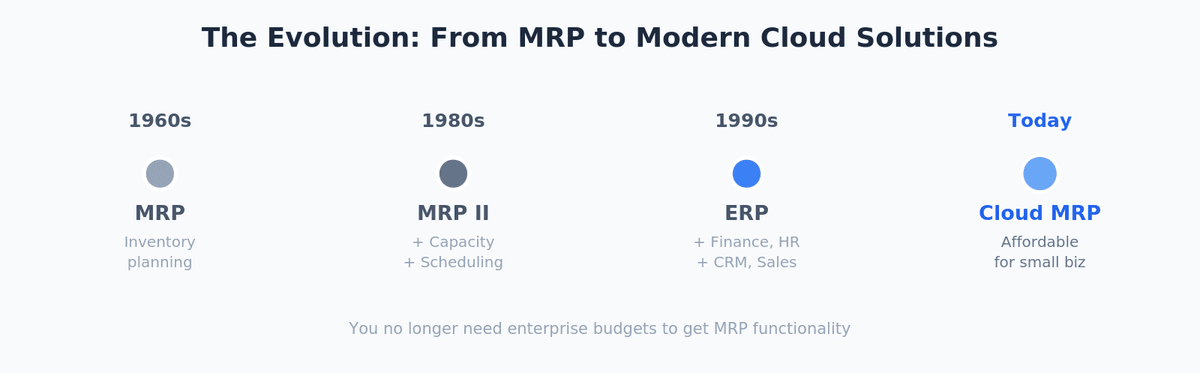
Why does this history matter? Because it explains why MRP functionality still exists as a module inside most ERP systems today. You're not choosing between two completely different things — you're choosing how much functionality you actually need.
What MRP Actually Does (With Real Examples)
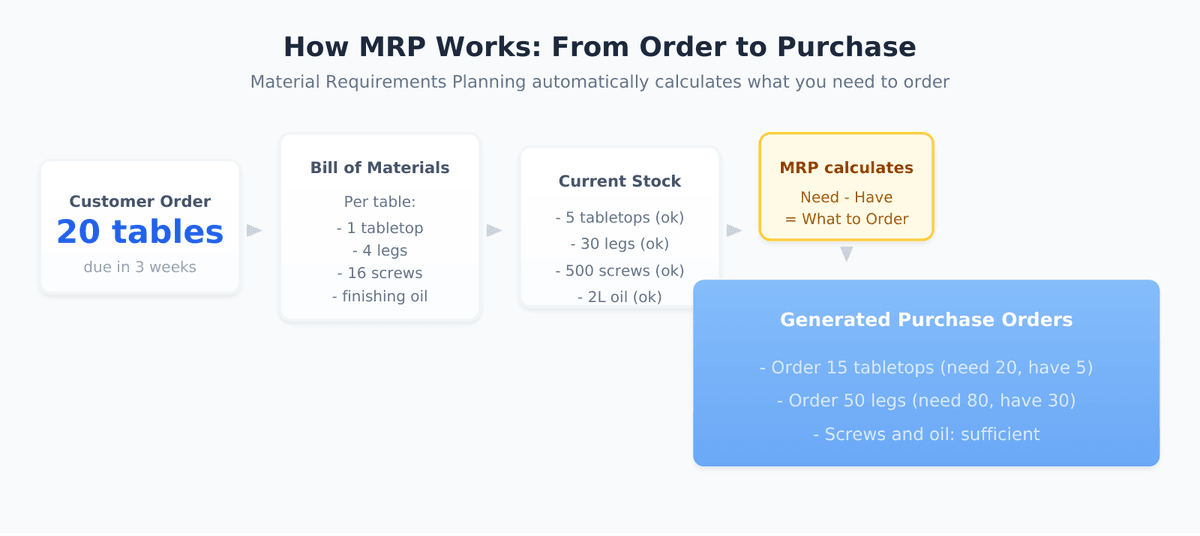
Let me walk you through how material planning works in practice. Imagine you run a small furniture workshop making wooden tables.
Each table requires: 1 tabletop, 4 legs, 16 screws, and finishing oil. That's your bill of materials. You have orders for 20 tables due in three weeks, and your supplier needs 5 days lead time for wood delivery.
An MRP system takes this information and works backward:
Week 3: Ship 20 tables
Week 2: Assemble tables (need all components ready)
Week 1: Order 20 tabletops, 80 legs, 320 screws
It checks your current inventory — you have 5 tabletops and 30 legs in stock — and generates purchase orders for what's missing. Simple, but incredibly powerful when you're juggling dozens of products with hundreds of components.
A cabinet maker I worked with was running everything in Excel. He'd regularly run out of drawer slides mid-project because he forgot to account for an upcoming order. After implementing basic MRP software, his stockouts dropped to nearly zero, and he stopped paying rush shipping fees.
What ERP Adds to the Picture
ERP systems wrap MRP functionality into a much larger package. While MRP software focuses on production needs, ERP extends to every corner of your business:
Financial management — general ledger, accounts payable and receivable, financial reporting. No more exporting data to your accounting software.
Human resources — employee records, payroll, time tracking. Useful once you have more than a handful of employees.
Customer relationship management — sales pipeline, customer history, order tracking. See which customers are profitable and which aren't.
Reporting and analytics — dashboards showing real-time business health across all departments.
A food equipment manufacturer I consulted for had their MRP system talking to QuickBooks, which talked to a separate CRM, which talked to a time-tracking app. Data got lost between systems constantly. They'd ship an order, but the invoice wouldn't generate because the systems weren't synced. Moving to an integrated ERP eliminated those gaps.
The Real Question: What Do You Actually Need?
Here's where I'll be honest with you, even though it might go against what many ERP and MRP software vendors tell you.
If you're a small manufacturer — say, under 20 employees, primarily focused on making things — you probably don't need a full ERP system. You need solid inventory management, production planning, and maybe basic customer tracking. That's core MRP functionality.
Full ERP makes sense when you have multiple departments that need to share data in real-time. When your accounting team is constantly asking your production team for numbers. When you're spending hours each week manually reconciling different systems. When you're scaling fast and need infrastructure that grows with you.
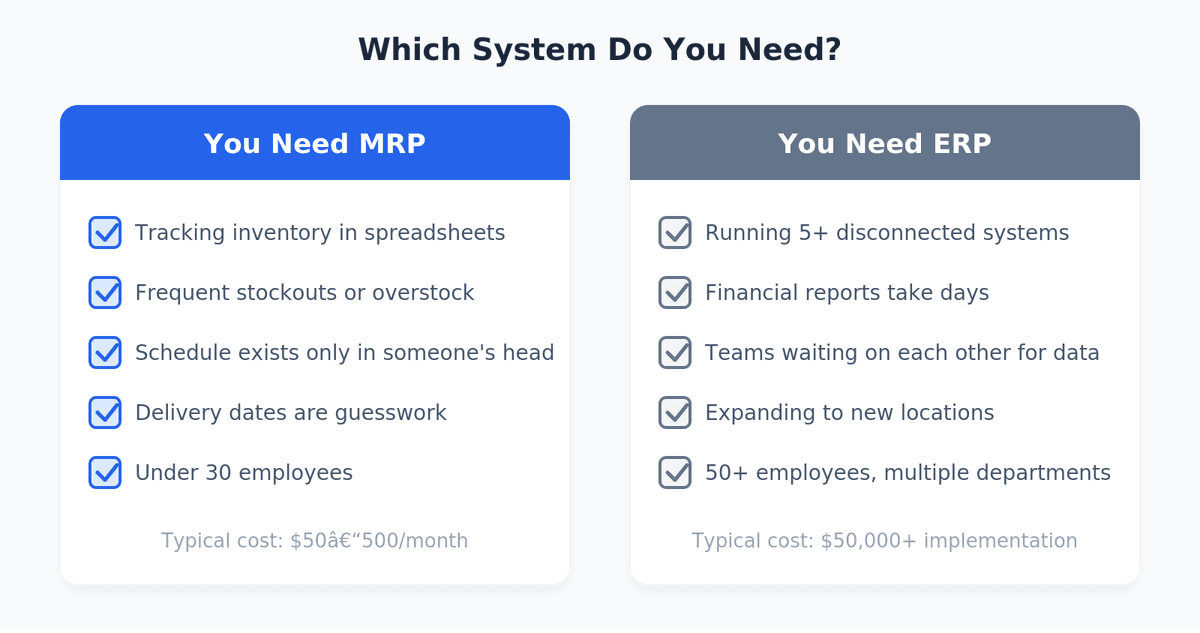
The cost difference is substantial. Basic cloud MRP systems run $50-500 per month. ERP implementations often start at $50,000 and can easily reach six figures when you factor in customization, training, and consultants. For a 10-person workshop, that's overkill.
Signs You Need MRP
You're tracking inventory in spreadsheets and constantly making mistakes. Last month you ordered materials you already had in stock; this month you ran out of something critical.
You can't answer basic questions quickly. "How many units can we ship next week?" shouldn't require 30 minutes of digging through files.
Your production schedule exists only in someone's head. When that person takes vacation, chaos ensues.
Customer delivery estimates are basically guesses. You promise dates, then scramble to meet them.
Signs You've Outgrown MRP and Need ERP
You're running multiple disconnected systems and spending hours on data entry between them.
Financial reporting takes days because you're pulling numbers from five different places.
You have separate teams for sales, production, and finance, and they're constantly waiting on each other for information.
You're expanding — new locations, new product lines, maybe international sales — and your current setup can't handle the complexity.
The Middle Path Most People Miss
Here's something the enterprise software salespeople won't tell you: modern cloud-based MRP systems have gotten really good. Many include light CRM functionality, basic financial tracking, and integrations with accounting software like QuickBooks or Xero.
For most small manufacturers, this middle ground is the sweet spot. You get the production planning and inventory management you desperately need, plus enough business functionality to run efficiently, without the cost and complexity of enterprise software.
One soap maker I know switched from Excel chaos to a lightweight MRP system costing €15/month. She went from constant stockouts to having clear visibility into her materials and production schedule. Six months later, she's shipping twice as many orders with less stress. She doesn't need SAP — she needed something that actually fits her business.
Questions to Ask Before You Decide
Before talking to any vendor, answer these honestly:
What's your actual pain point? Is it inventory management, production scheduling, financial reporting, or something else? Buy software that solves your real problem, not a theoretical future problem.
How many people need to use the system? Solo operators and small teams have different needs than organizations with distinct departments.
What's your realistic budget? Include implementation time and training, not just subscription costs.
What systems do you already use? Sometimes the best solution is better integration between existing tools, not a complete replacement.
How fast are you growing? If you're doubling revenue every year, invest in scalable infrastructure. If you're stable and happy at your current size, don't overbuy.
Making the Decision
Start with what you need today. If your main challenge is knowing what materials to order and when, start with MRP. You can always upgrade later — most ERP systems include MRP modules, so your core data and processes will transfer.
Don't let software vendors scare you with "you'll outgrow it" arguments. Yes, you might outgrow a basic system eventually. But implementing something you can actually use today beats implementing something complex that sits unused because nobody has time to learn it.
The best system is the one you'll actually use consistently. For most small manufacturers, that's a focused tool that solves their specific problems without overwhelming them with features designed for companies ten times their size.
Frequently Asked Questions
What does MRP stand for?
MRP stands for Material Requirements Planning. It's a system that calculates what materials you need, in what quantities, and when to order them based on your production schedule and current inventory.
What is MRP in manufacturing?
In manufacturing, MRP is the system that connects your sales orders to your production floor. It takes your bill of materials, checks current stock levels, and generates purchase orders or production schedules so you never run out of what you need mid-production.
What's the difference between MRP and ERP?
The main difference is scope. MRP focuses specifically on production planning and inventory management. ERP includes MRP functionality plus modules for accounting, HR, CRM, and other business functions. Think of MRP as one piece of the puzzle; ERP is the whole puzzle.
Is MRP part of ERP?
Yes, most enterprise resource planning systems include MRP as a module. When vendors talk about "manufacturing ERP," they usually mean an ERP system with strong MRP capabilities built in.
Can small businesses use MRP without full ERP?
Absolutely. Many small manufacturers only need the inventory and production planning that MRP provides. Standalone MRP systems are cheaper, faster to implement, and often sufficient until you grow past 30-50 employees.
How much does MRP software cost?
Cloud-based MRP systems typically range from $50-500/month depending on features and user count. Some lightweight options like Krafte start as low as €7/month. Traditional ERP systems cost significantly more — often $50,000+ for implementation alone.
What does MRP mean for supply chain?
MRP in supply chain ensures you have the right materials arriving at the right time to meet production needs. It coordinates purchasing with production schedules and helps avoid both stockouts and excess inventory that ties up your cash.
Wrapping Up
The difference between ERP and MRP comes down to scope. MRP handles materials, inventory, and production planning. ERP handles that plus everything else in your business.
For small manufacturing operations, MRP functionality is usually what you need. It solves the core problem — knowing what to make, what materials you need, and when to order them. As your business grows and you need tighter integration across departments, ERP becomes more attractive.
Don't overthink it. Pick something that solves your immediate pain point, implement it properly, and move on to actually running your business.
Running a small manufacturing operation and tired of spreadsheet chaos? Krafte gives you the production planning and inventory management you need, starting at €7/month. No enterprise complexity, no lengthy implementation — just tools that help you make things. Try it free for 30 days.Tags: ERP, MRP, Inventory Management